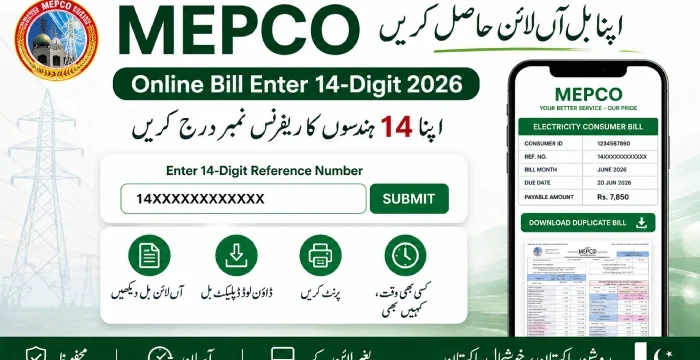
MEPCO Online Bill Check September 2026
To check your mepco online bill, enter your 14 digit reference number or 10-digit customer ID in the box below, and click the “search bill” button to view and download you bill.
Enter the Customer ID printed on your bill.
MEPCO stands for Multan Electric Power Company. It is a government-owned company that supplies electricity across South Punjab, licensed for this job by NEPRA, Pakistan’s power sector regulator.
MEPCO covers 13 districts:
- Multan
- Muzaffargarh
- Layyah
- Dera Ghazi Khan
- Rajanpur
- Lodhran
- Bahawalpur
- Rahim Yar Khan
- Khanewal, Sahiwal
- Pakpattan, Vehari
- Bahawalnagar
It serves close to 34 million people across this region. If your electricity connection sits in any of these districts, MEPCO is your power provider, and your monthly bill comes from them.
What Is the MEPCO 14-Digit Reference Number?
The 14-digit reference number is the code that pulls up your bill on MEPCO’s system. Enter it correctly, and the site shows your current charges, past payments, and due date within seconds.
This number is not random. It’s tied to your specific account and billing month, which is why the site needs all 14 digits to find the right record.
Where to Find It on Your Bill
Look at the top left corner of your paper bill. The reference number sits right there, usually just below or beside your consumer number. If you don’t have a recent paper copy, an older bill will still work, since the system also recognizes past reference numbers.
If you don’t understand where to find the reference number. Please see the image below to locate you reference number and customer ID easily.
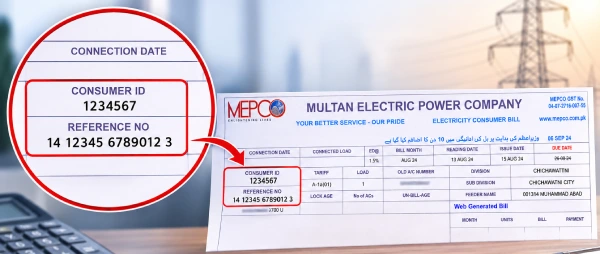
Reference Number vs Consumer ID
People mix these two up a lot, so here’s the plain difference:
- Consumer ID stays the same every month. It’s your permanent account number with MEPCO.
- Reference number changes with every new bill. It’s tied to that month’s invoice, not your account as a whole.
If you type in your Consumer ID and the site rejects it, switch to the reference number from your latest bill instead. Most portals accept either one, but the reference number is the one built specifically for online lookups.
How to Check MEPCO Bill Online With the 14-Digit Number
MEPCO’s billing data runs through bill.pitc.com.pk, the site built by the Punjab Information Technology Board (PITC) for MEPCO and other Punjab power companies. A few other websites also let you check your MEPCO bill using the same reference number, since they pull the same billing data. Whichever site you use, the steps are almost identical.
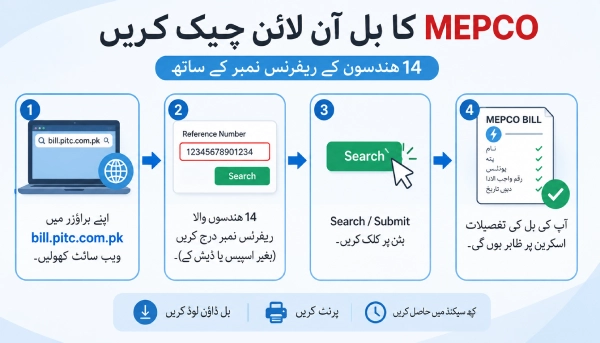
Steps to Enter Your 14-Digit Number and Check Your Bill
- Open the billing website on your browser.
- Find the box that asks for your reference number.
- Type your 14 digits with no spaces or dashes.
- Press Search, Submit, or Check Bill.
- Your bill loads on the screen within a few seconds.
What You’ll See After You Submit the Number
Once the page loads, you’ll see your name, address, billing month, units consumed, amount payable, and due date. From there, you can read the full bill on screen, download it, or print it.
Can You Check the Bill With Consumer ID Instead?
Yes. Most MEPCO billing sites let you search with either the 14-digit reference number or your 10-digit consumer ID. If you only have your consumer ID handy, use that box instead of switching bills to find the reference number.
How to Download and Print Your MEPCO Bill
Once your bill is on screen, saving or printing it takes one extra step.
On a Computer or Laptop
Press Ctrl + P on your keyboard. When the print menu opens, choose “Save as PDF” if you want a digital copy, or send it straight to your printer if you need a paper copy.
On a Mobile Phone
Tap your browser’s menu button (usually three dots in the corner) and look for a download or print option. Most phone browsers can save the page as a PDF directly to your gallery or files app.
How to Check If Your MEPCO Bill Is Paid
If you’ve already paid and want to confirm the payment was recorded, the process is the same as checking a fresh bill.
Steps to Check Your Payment Status
- Enter your reference number or consumer ID on the billing site.
- Open your bill.
- Scroll to the bottom right of the page, near the payment date section.
- If your payment has been processed, the status will show as updated right there.
Why the Status Might Take Time to Update
The online system doesn’t always update the moment you pay. If you paid within the last few hours, give it some time to sync. The MEPCO mobile app tends to reflect payments faster than the website, so use it if you need to confirm a payment quickly.
Common Mistakes When Entering the 14-Digit Reference Number
If the search keeps failing, it’s usually one of these:
- Wrong digit count – even one missing digit stops the search from working. Count them again before you try.
- A stray space – an extra space at the start or end of the number will break the search.
- An old or unrelated bill – double-check you’re copying the number from your most recent bill, not an old one from a different account.
- The wrong website – stick to a trusted billing site and watch out for copycat links that look similar but aren’t connected to MEPCO’s data.
How to Check Your MEPCO Bill Through SMS
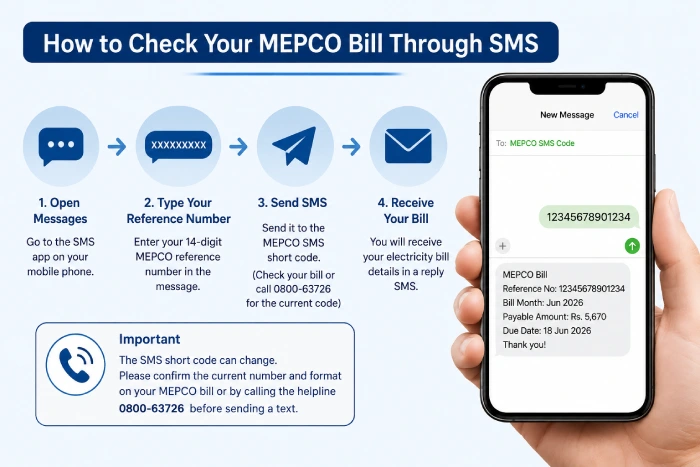
MEPCO also supports checking your bill by text message for people without internet access at that moment. The short code used for this service can change, so it’s best to confirm the current number and format on your paper bill or by calling the MEPCO helpline (0800-63726) before sending a text, so you don’t send your reference number to the wrong place.
Understanding What’s On Your MEPCO Bill
A MEPCO bill has more fields than most people expect. Here’s what each one means.
Basic Bill Details
- Units Consumed – the total electricity used during the billing period, measured in kWh.
- Tariff Rate – the per-unit charge, which depends on whether your connection is residential or commercial.
- Meter Reading – some bills now include a photo of your meter alongside the reading, so you can double-check the units yourself.
- Arrears – any unpaid balance carried over from a previous bill. A number here means an earlier bill wasn’t fully cleared.
- Payable Amount – the actual electricity charge for the month, before extra tax and tariff adjustments are added.
- Due Date – pay after this date, and a late surcharge usually gets added to your next bill.
Taxes and Surcharges Explained
Your total isn’t just the electricity charge. A few government-mandated additions usually show up too:
- General Sales Tax (GST) – a standard tax applied to most goods and services, including electricity.
- Income Tax on Energy Bills – a tax reflected on your bill as part of MEPCO’s obligations as a service provider.
- Fuel Price Adjustment (FPA) – adjusts your bill up or down based on recent changes in fuel prices used to generate electricity.
- TR Surcharge (Tariff Rationalization Surcharge) – covers the gap between the tariff set by NEPRA and the one approved by the Government of Pakistan.
- QTR Tariff Adjustment – a quarterly revision that reflects changes in generation cost and fuel prices over that period.
- Deferred Amount – an installment you’ve agreed to pay in a later month. It carries no late fee on its own.
- Octroi Tax – a local tax applied by municipalities, which can appear on your electricity bill (Bijli ka Bil) depending on your area.
MEPCO Peak Electricity Hours
Electricity costs more to generate during certain hours of the day, and MEPCO asks consumers to cut back on usage during these windows where possible. Here’s the seasonal breakdown:
| Months | Peak Hours Duration | Time Slot |
|---|---|---|
| December to February | 5 hours | 5 PM to 9 PM |
| March to May | 5 hours | 6 PM to 10 PM |
| June to August | 5 hours | 7 PM to 11 PM |
| September to November | 5 hours | 6 PM to 10 PM |
Cutting back on heavy appliances during these hours, even for a few days a month, can make a real difference to your next bill.
Ways to Pay Your MEPCO Bill Online
Once you’ve checked your bill, you have a few options to pay it without visiting a bank branch:
- JazzCash or Easypaisa – pay directly through either mobile wallet app using your reference number.
- Mobile banking apps – most Pakistani banks let you pay utility bills through their app, free of charge.
- HBL Konnect agents – visit a nearby Konnect agent and pay in cash if you’d rather not use a mobile wallet.
MEPCO also offers installment plans for larger bills. The number of installments depends on the size of your bill, so it’s worth asking your local MEPCO office or calling the helpline to confirm what you qualify for.
Areas MEPCO Covers in South Punjab
MEPCO handles power distribution and billing for 13 districts across South Punjab:
Multan, Muzaffargarh, Layyah, Dera Ghazi Khan, Rajanpur, Bahawalpur, Bahawalnagar, Lodhran, Rahim Yar Khan, Khanewal, Sahiwal, Pakpatan, and Vehari.
If your area falls in one of these districts, MEPCO is your electricity provider. If not, you’ll need to check with your local DISCO instead, since their billing system won’t recognize a MEPCO reference number.
MEPCO Helpline and Complaint Numbers
For general questions, outages, or load shedding updates, MEPCO runs a helpline available all day, every day:
Helpline: 0800-63726
For a complaint tied to your specific region, call the number for your area instead:
| Region | Complaint Number |
|---|---|
| Multan | 061-9220198 |
| Bahawalnagar | 063-9239031 |
| Sahiwal | 040-9200305 |
| Muzaffargarh | 066-9200065 |
| Dera Ghazi Khan | 064-9239229 |
| Vehari | 067-3360282 |
| Bahawalpur | 062-9250102 |
| Rahim Yar Khan | 068-9230160 |
Need More Help? How to Reach MEPCO Directly
If your bill still won’t load, or something on it looks wrong, you can visit your nearest MEPCO sub-division office in person. Bring your last paid bill along, and keep your reference number and CNIC ready, since staff will ask for both to pull up your account.
For written or head-office queries, MEPCO’s main office is located at:
Mepco Complex, Khanewal Road, MEPCO Colony, Multan Phone: 061-9220313, 061-9220314, 061-9220315
FAQ’s
What is the MEPCO 14-digit reference number used for?
It’s the code that identifies your specific bill. Enter it on a MEPCO billing site to view or download your current charges and due date.
Is the Consumer ID the same as the reference number?
No. Your Consumer ID stays the same every month and identifies your account permanently. The reference number changes with each new bill.
Can I check my MEPCO bill on my phone?
Yes. Any MEPCO billing site works on a phone, tablet, or laptop without needing a separate app, though the MEPCO app is also available if you want faster payment updates.
Why does my reference number keep changing every month?
Because it’s linked to that specific bill, not your account as a whole. Your Consumer ID is the number that never changes.
Can I check my bill using my CNIC number?
No. Online bill checks only work with your 14-digit reference number or 10-digit Consumer ID.
Can I get more time to pay my MEPCO bill?
Due date extensions can be requested. Contact your regional MEPCO office or the helpline to ask about extending a specific bill.
Is checking my MEPCO bill online free?
Yes. Viewing, downloading, and printing your bill online costs nothing.
Does MEPCO offer installment plans for large bills?
Yes, for bills above a certain amount. The exact number of installments depends on your bill size, so confirm the details with your local MEPCO office.



I was not sure which number to put in the MEPCO bill page, now I understand it.
Very straightforward. I didn’t have to read it twice to understand.