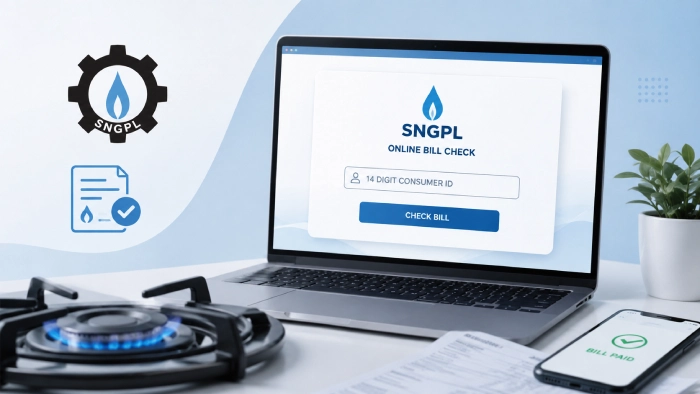
Check SNGPL Bill Online November 2026
To do your SNGPL bill check online, click the button below and enter your 14 Digit Reference Number or 11 consumer number to view and download your bill.
Check your bill without CAPTCHA, for free, No login needed.
What Is SNGPL
Sui Northern Gas Pipelines Limited (SNGPL) is Pakistan's largest gas distribution company. It was set up in 1963 and is based in Lahore. Today it supplies gas to more than 7.2 million consumers. OGRA, the Oil and Gas Regulatory Authority, sets its gas rates and handles complaints across the industry.
Which Areas Does It Serve
SNGPL covers the northern half of Pakistan: all of Punjab, Khyber Pakhtunkhwa, Islamabad, and Azad Jammu & Kashmir. Its main cities include:
- Lahore
- Faisalabad
- Multan
- Rawalpindi and Islamabad
- Peshawar
- Muzaffarabad
If your gas connection is anywhere in Punjab, KPK, Islamabad, or AJK, you're an SNGPL customer, and the steps in this guide apply to you. If you're in Karachi, Hyderabad, or Quetta, you're on SSGC instead, and this page won't work for you.
How to Check Your SNGPL Bill Online - Step-By-Step 2026
- Open the official SNGPL website sngpl.com.pk.
- Find the bill check or "Consumer Bill" page.
- Enter your 11-digit consumer number.
- Solve the captcha.
- Your bill shows up, current month and a few past ones too.
- Download it as a PDF if you want a copy.
That's it. No login, no app required for this part.
11 Digits or 14 Digits? Here's the Real Answer
Your gas bill has two numbers on it. That's the confusing part.
The Reference Number is 14 digits. It changes every month. Banks, ATMs, and mobile wallets ask for this one when you're paying, not checking.
The Consumer Number is 11 digits. It's permanent. It's also the one the SNGPL website actually wants when you check your bill online.
So if you've been typing your 14-digit number into the bill check box and getting nowhere, that's why. Grab your 11-digit consumer number instead.
You'll find it printed on any old bill, usually near the top, under "Consumer Number" or "Account ID." Type it exactly as printed. Don't drop the zeros at the start if there are any.
Can You Check an SNGPL Bill Using Just Your CNIC?
Short answer: NO
The SNGPL site has no bill-check-by-CNIC option. You still need that 11-digit consumer number. Your CNIC only comes up if you're paying in person, at a bank counter, a NADRA Kiosk, or a post office, where someone might ask to see it.
Wait, Are You Even an SNGPL Customer?
Worth checking before you go further. Pakistan has two gas companies, and they don't share a system.
- SNGPL covers Punjab, KPK, and Azad Kashmir.
- SSGC covers Sindh and Balochistan.
Live in Punjab, KPK, and Azad Kashmir? You're on SNGPL, and the below guide will help you check, view, download and pay your bill easily.
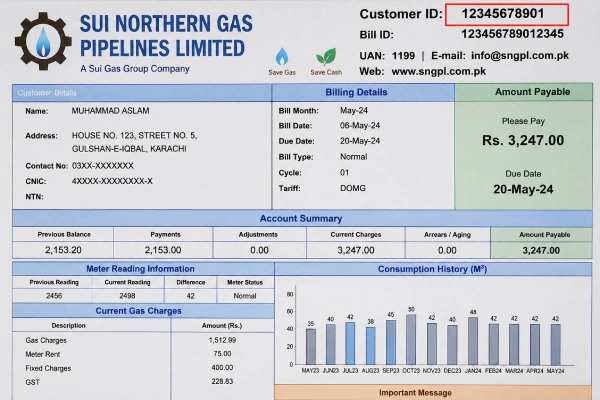
What Your SNGPL Bill Looks Like
Here's a sample copy of an SNGPL bill, so you know exactly what to look for. See how your Bill ID looks like in the image below. This is the same number you'll type into the SNGPL bill checker, when you check your bill.
Things That Actually Help
A few things nobody mentions but should:
- Save your consumer number in your phone right now. Future you will thank you.
- Lost your paper bill? Check old bank receipts or old SMS from SNGPL. The number often shows up there too.
- Site running slow? It happens a lot in the first week of the month. Try late at night instead.
- Typed it and got an error? Recheck every digit. One wrong number is the usual culprit.
How to Pay Your Bill Online:
Once you know the amount, here's where you can pay it:
- Internet or mobile banking. Pick "Bill Payment," choose SNGPL, enter your consumer number, done.
- SNGPL's own app, ConnectOn. Works for both checking and paying.
- Easypaisa, JazzCash, or UPaisa, if you'd rather use your phone number than a bank account.
- Most bank ATMs take gas bill payments too.
- Prefer paying in person? NADRA Kiosks, GPOs, and post offices still work fine.
Paying at a GPO or NPO
No internet? No problem. Just take your original gas bill to your nearest General Post Office (GPO) or Night Post Office (NPO) and pay in cash at the counter. That's it. These offices run on regular working hours, and a few stay open later for anyone who can't make it during the day. Good option if apps and online banking aren't really your thing.
Paying Through Your Bank
Prefer to pay online instead? SNGPL bills go through most major banks in Pakistan. Think National Bank of Pakistan, Habib Bank, United Bank, Allied Bank, Bank Alfalah, Bank Al Habib, Meezan Bank, Soneri Bank, Askari Bank, MCB, Habib Metro, Bank Islami, Standard Chartered, Bank of Punjab, and Bank of Khyber. Not on the list? Doesn't matter. Any bank registered with the State Bank of Pakistan can process it too.
For electricity bills, the process is slightly different. Here's our complete guide on MEPCO online bill enter 14-digit 2026.
What's Actually on Your SNGPL Bill
- Consumer Number – your permanent ID, never changes.
- Reference Number – just for this month's payment.
- Billing period – the dates your usage was measured.
- Meter readings – opening, closing, and total gas used.
- Charges – gas cost, meter rent, tax, and anything unpaid from before.
- A helpline number, for when something's wrong.
When Something Goes Wrong
"Record Not Found" usually means a typo. Double check the number. If it's correct, your latest bill might just not be ready yet, give it a day or two.
Site won't load? Happens most near the start of the month when everyone's checking at once. Try later, or just use the ConnectOn app.
Amount looks off? Compare it to your own meter reading first. Still doesn't add up? Call the helpline and raise a complaint.
Fast Answers
Can you check by name instead of a number? No, only the consumer number works.
Is the SNGPL site safe? Yes, as long as it's the real sngpl.com.pk. Skip any copycat site asking for your details.
Need help? Call 1199. That covers both billing questions and gas emergencies.
One Last Thing
Once you've got your 11-digit consumer number saved somewhere, checking your SNGPL bill takes under a minute. Paying it is just as quick. Stick to the official site or app, and you'll never need to wait around for a paper copy again.
FAQ's
Can I check my SNGPL bill by CNIC?
No. SNGPL’s online system asks for the consumer number, not CNIC. Your CNIC only comes into play when you pay in person at a bank counter, a NADRA e-Sahulat kiosk, or a post office, or when you call the helpline to recover a lost consumer number.
Can I check my SNGPL bill without the old bill?
Yes, if you have your consumer number from another source, like SMS alerts, the SNGPL app, an old payment receipt, or your landlord (if the connection is in their name). Without any of these, call the SNGPL helpline at 1199 with your name, address, and CNIC, and they can look it up for you.
How many digits is the SNGPL Consumer Number?
It’s 11 digits, including any leading zeros. Type it exactly as printed on your bill, don’t skip the zeros at the start.
How can I get an SNGPL duplicate bill?
Go to the SNGPL bill check page and enter your 11-digit consumer number. Your current bill, along with the due date and amount, will show up, and you can download or print it from there.
Can I check my SNGPL bill by name or meter number?
No. The online checker only works with the consumer number. Your meter number is different and won’t work in this field.
What should I do if my SNGPL bill has the wrong amount?
Visit your nearest SNGPL Customer Service Centre with a copy of the bill and your CNIC. You can also call 1199 or use the SNGPL app to file a complaint. Keep the complaint reference number so you can follow up later.
Can I check someone else’s SNGPL bill?
Yes, technically. The online checker doesn’t check who you are, it just needs the consumer number. Anyone who has that number can pull up the bill.
What if I lost my SNGPL bill and don’t know my Consumer Number?
Call 1199 and give your full address and CNIC. The SNGPL support team can find your consumer number from their records. If you live in a rented place, ask your landlord too, since the connection is usually under their name.
Is SNGPL the same as SSGC?
No, they’re separate companies. SNGPL covers Punjab, Khyber Pakhtunkhwa, Islamabad, and Azad Kashmir. SSGC covers Sindh and Balochistan, including Karachi, Hyderabad, and Quetta. If you’re in an SSGC area, the SNGPL bill checker won’t work for you.
Sources:



Gas ab bht jany lgi ha esa ku
My bill is around 1 lac and units is not consumed much, that why I was searching and found this guide, now i have filed a complaint to sngpl for this issue.