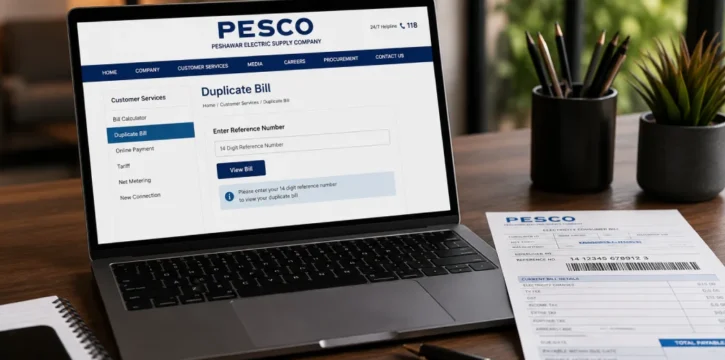
A PESCO duplicate bill is a fresh copy of your electricity bill, pulled from the same billing record as your original. You can get PESCO Bill online in a couple of minutes if your paper bill got lost, damaged, or never showed up at your door. It carries the same details as the original: bill amount, due date, billing month, and your reference number.
What You Need Before You Start
You only need one thing to open your bill: the 14-digit reference number. It's printed on the top-left corner of any past PESCO bill, right under the company name and logo. If you can't find it there, look for the 10-digit Consumer ID instead. It sits close to the reference number and works the same way.
PESCO doesn't let you check a bill by name or CNIC. This is a privacy rule, not a website limit, so the reference number or Consumer ID is the only route in.
How to Check Your PESCO Duplicate Bill Online
- Go to the official PESCO website at pesco.com.pk, or use the bill checker on this page.
- Type in your 14-digit reference number or 10-digit Consumer ID. No spaces or dashes.
- Click "Check Bill" or "Submit."
- Your bill loads on screen, showing the amount, due date, and billing month.
- Download it as a PDF or print it straight from there.
That's the whole process. No account, no app, and no charge for the duplicate copy.
Don't Have Your Reference Number?
If you've misplaced every past bill, you still have a few ways to find your reference number:
- Check with a neighbour or the previous tenant if you share the same meter connection.
- Call the PESCO helpline and ask them to look it up against your meter details.
- Visit your local PESCO customer service centre with your CNIC and address.
Without the reference number or Consumer ID, the online system won't pull up your bill.
A Note for Hazara Division Customers
If your connection is in Hazara Division, your bill no longer comes through PESCO. In January 2026, PESCO split its Hazara-1 and Hazara-2 circles into a separate company called HAZECO (Hazara Electric Supply Company). If you live in that region, check your bill through HAZECO's own billing system instead of PESCO's.
Paying Your Bill After You Download It
Once you have your duplicate bill, you can pay it a few different ways:
- At any bank branch, post office, or JazzCash/Easypaisa shop.
- Through your bank's mobile app or internet banking.
- Over the counter using the printed copy.
Pay before the due date printed on the bill. Late payment adds a surcharge on top of your bill amount.
Common Problems and Fixes
- "Invalid reference number" message: Recount the digits. It should be exactly 14 digits, with no letters or spaces.
- Page not loading: Try again after a few minutes, or switch to a different browser or device.
- Old bill not available: Some sites only keep the current and previous month. Call the PESCO helpline for older records.
- Still stuck: Contact PESCO directly using the helpline below.
PESCO Helpline and Contact Details
- Helpline: 111-000-128
- Official website: pesco.com.pk



