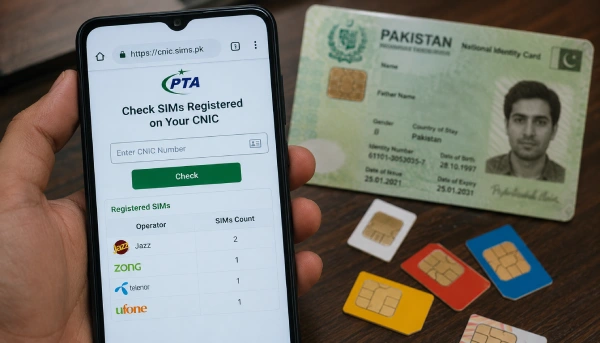
Quick Steps
You only need your CNIC number. Pick either method:
By SMS:
- Open your messaging app
- Type your 13-digit CNIC number, no dashes
- Send it to 668
- You'll get a reply showing your SIM count by network
By website:
- Go to cnic.sims.pk
- Enter your CNIC number
- Complete the captcha
- Submit, and your results will show up
Both methods come straight from PTA, Pakistan's official telecom regulator, and they're free to use. use our live live sim tracker to track the sim owner details.
Why This Matters
Every SIM in Pakistan has to be linked to a CNIC through fingerprint verification. Most of the time, this system works fine. But sometimes a SIM ends up registered on someone's CNIC without them knowing, maybe from an old connection they forgot about, or in rare cases, from someone else misusing their ID. Checking your SIM count once in a while helps you catch this early.
Sending an SMS to 668, Step by Step
- Open the messaging app on any phone, on any network.
- Type your CNIC number as 13 digits, with no dashes or spaces.
- Send the message to 668.
- Within a few seconds, PTA sends back a reply showing how many SIMs are registered under your CNIC, broken down by mobile operator.
This method works on any Pakistani SIM. Standard SMS charges from your network may apply.
Checking Through cnic.sims.pk, Step by Step
- Open a browser on your phone or computer.
- Go to cnic.sims.pk. This is PTA's official web portal for this service.
- Enter your CNIC number.
- Complete the captcha to confirm you're not a bot.
- Submit the form to see your results.
This method works from anywhere, including from outside Pakistan, so it's useful if you don't have a Pakistani SIM handy.
If You Find a SIM You Don't Recognize
- Contact that network's customer service first and ask them to block it.
- If the operator doesn't resolve it, file a complaint with PTA.
- You can reach PTA's Consumer Support Centre at 0800-55055, open 9 AM to 9 PM, seven days a week.
- You can also file a complaint online at complaint.pta.gov.pk.
Don't wait too long on this. An unknown SIM under your CNIC could be used for scams or fraud that end up tracing back to your name.
One Important Thing to Know
This method only shows SIMs registered on your own CNIC. It's not a way to find out who owns someone else's phone number, and no legal service in Pakistan offers that. Any website claiming to reveal a stranger's identity from their phone number isn't following PTA rules, and sharing your CNIC with such sites puts your own information at risk.



