Customers can check, download and print KE duplicate bill online here. Type your 13-digit Account Number and your 8-digit Consumer Number into the box below and press Check Bill. Your KE duplicate bill shows up in a few seconds, with the payable amount, due date, and units consumed ready to view, download, or print as a PDF.
Check KE Duplicate Bill Online October 2026
To check your KE duplicate bill, click the button below and enter your 8-digit Customer Number and 13-digit Account Number.
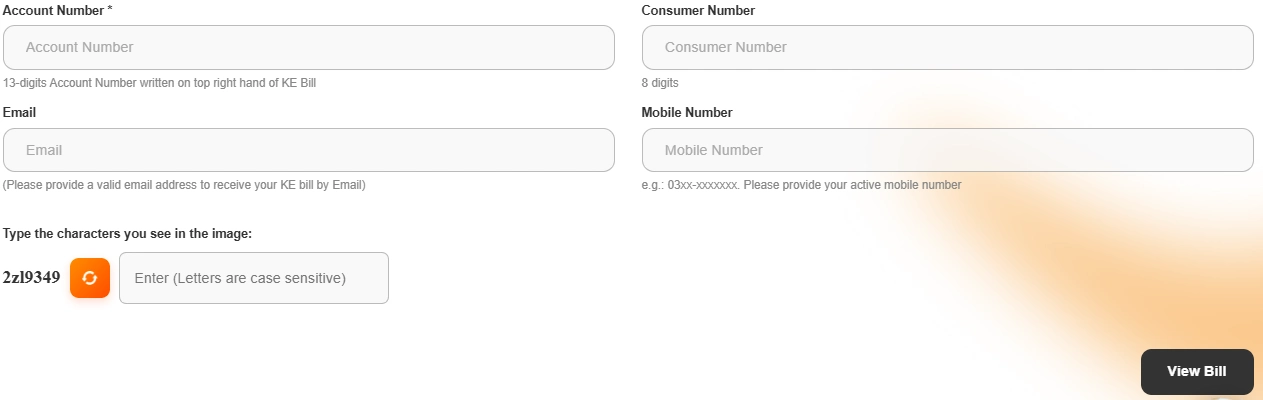 If you don't have both numbers written down anywhere, the sections below show where to find them on an old bill, plus three other official ways K-Electric lets you pull a bill without opening the website at all.
A few things worth knowing before you start.
- The Account Number has 13 digits and sits on the top right of every KE bill.
- The Consumer Number has 8 digits and sits close to the Account Number on the same bill.
- Checking, viewing, and downloading a duplicate bill costs nothing.
- A duplicate bill works exactly like the original, and gets accepted anywhere the original would.
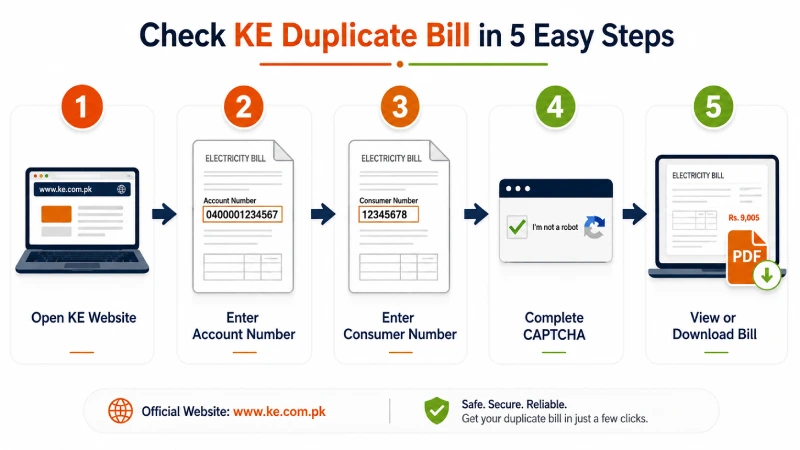
Check Your KE Bill In Seconds - 5 Simple and Easy Steps
For a second look, or if the tool above isn't loading for some reason, K-Electric's own website carries the same billing data.
- Open www.ke.com.pk on a phone or computer.
- Go to the KE Bill Payment or Duplicate Bill section.
- Enter your 13-digit Account Number and 8-digit Consumer Number.
- Complete the captcha shown on screen.
- Press View Bill.
Your bill opens on screen. Select the download option to save your KE duplicate bill as a PDF, or use the print option for a paper copy.
K-Electric Overview 2026
K-Electric has run Karachi's power supply for more than a hundred years, going back to 1913, and it's the only utility in Pakistan that handles generation, transmission, and distribution under one company. Beyond Karachi itself, KE also reaches Dhabeji and Gharo in Sindh, plus Uthal, Vinder, and Bela in Balochistan, putting more than 3.7 million customers on its books.
Checking a KE duplicate bill online fits into that same setup. A consumer once stood in line at a payment counter to get a copy of a lost bill. Now the same copy loads on a phone in under a minute, with the account number and consumer number doing the work a queue used to.
What is a KE Duplicate Bill
This term causes more confusion than it should. A duplicate copy is not a new or separate bill. It's a reprint of the original, pulled from the same K-Electric system that generated it the first time. The amount owed, the due date, and the units consumed stay exactly the same as what was printed on the original copy. People usually need one when the original never arrived, got lost in the mail, or ended up thrown out by mistake.
Account Number or Consumer Number, Which One Do You Need
K-Electric prints two numbers on every bill, and either one works for a duplicate bill check.
The Account Number runs 13 digits long and appears on the top right corner of the bill. This is the number most online tools ask for first.
Check the image below, to find them in your bill.
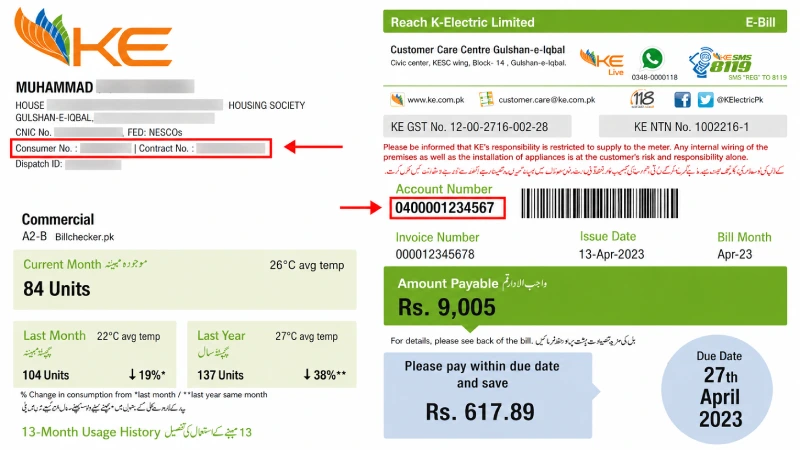
The Consumer Number is shorter, 8 digits, and sits close to the Account Number on the same page. K-Electric sometimes asks for both together, so it helps to have both written down rather than only one. KE does not support checking a bill using a CNIC number or a name. Only the Account Number and Consumer Number work for an online check.
Three More Ways To Get Your KE Bill
Save 0348-0000118 in your phone contacts and send the word Hi on WhatsApp. K-Electric's automated chat opens a short menu. Pick the bill option, and a PDF or image copy of your latest bill arrives in the chat within moments. The same number handles outage status, load shedding schedules, and complaint registration too, so it's worth keeping saved for more than bill checking alone.
SMS
K-Electric runs a bill service over SMS for anyone without a smartphone or a data connection. Registered numbers text BILL to 8119 and get the latest bill details back by reply. Numbers not yet registered can text BILL followed by their 13-digit Account Number to the same 8119, no separate registration step needed first. To register a number for ongoing SMS alerts, text REG followed by the Account Number. Texting UNREG followed by the Account Number removes a number from the list.
KE Live App
K-Electric's own app, KE Live, covers bill checking along with a few things the website and SMS service don't. Beyond viewing and downloading a duplicate bill, it lets a consumer submit a self meter reading with a photo, track monthly usage, and get load shedding updates for a specific feeder. It's free on both Android and iOS.
How to Download KE Duplicate Bill in PDF
- Find your 8-digit Consumer Number and 13-digit Account Number.
- Visit the official K-Electric website and open the Duplicate Bill service.
- Enter your Consumer Number and Account Number.
- View your bill and click Download PDF to save it.
- Pay your bill easily through Easypaisa, JazzCash, or Online Banking.
KE Duplicate Bill Layout Explained for 2026
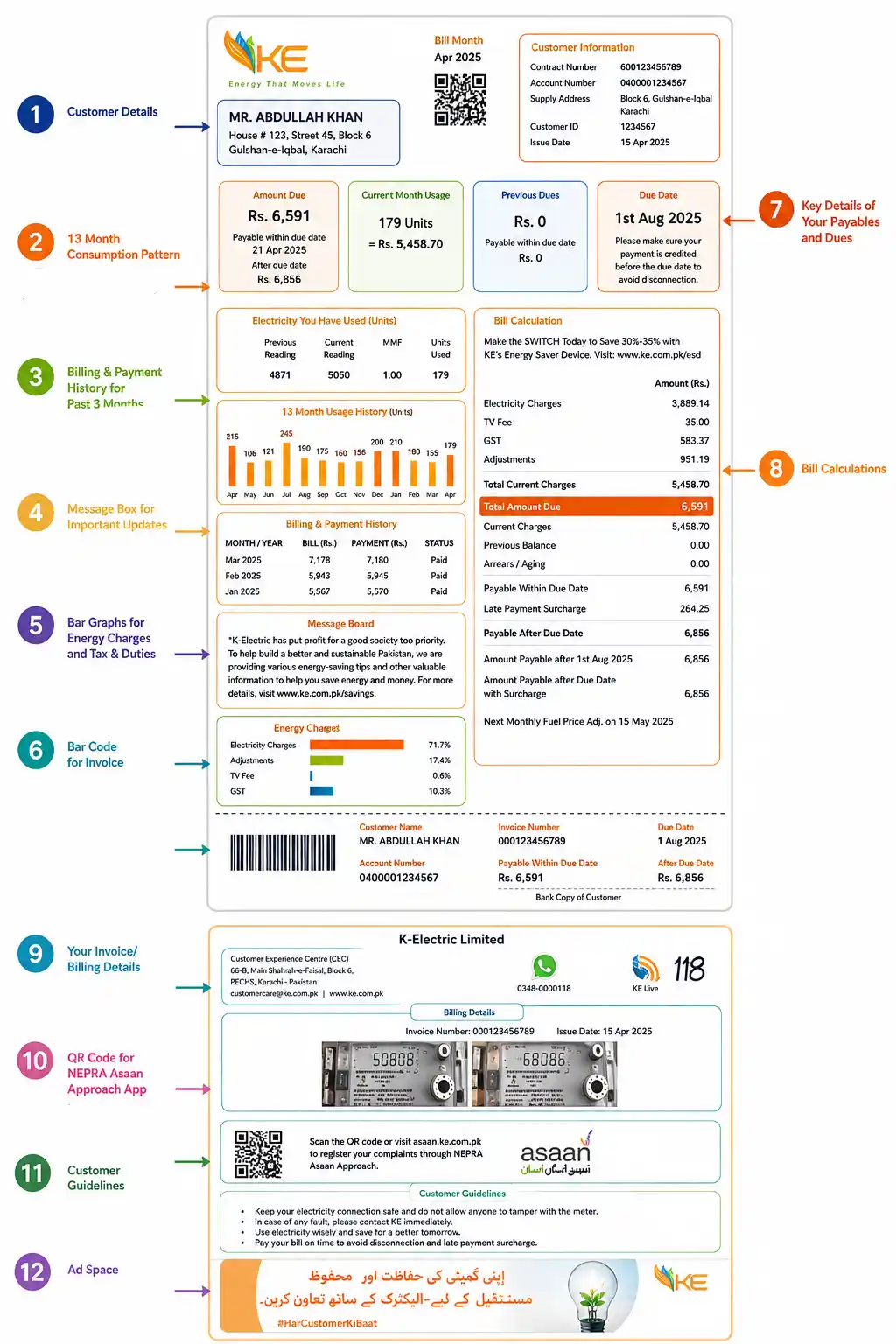
What a Duplicate Bill Gets Used For
A downloaded KE bill duplicate does more than settle a payment. Banks often ask for a recent electricity bill as proof of address for a loan or account opening. Government offices and NADRA sometimes need one for the same reason. Anyone filing taxes or applying for a new gas or water connection tends to get asked for a utility bill too, and a duplicate copy serves the same purpose as the original for all of these.
Duplicate KE Bill Payment Methods - Working 2026
A duplicate bill works the same as the real one. Once you have the PDF or a printed copy, you pay it the same way as your normal monthly bill.
Mobile Wallets / Bank Apps.
Open your app, such as JazzCash, Easypaisa, or your own bank's app. Find the Bill Payment section. Search for K-Electric. Type in your account number. Confirm the payment and save the receipt.
You can also pay right on the K-Electric website with a Visa or Mastercard.
If you like paying in person, take the bill to any commercial bank or a Pakistan Post office. Show your bill and pay the amount in cash.
If Your Bill Looks Wrong
A few billing problems come up often enough to explain here rather than send someone straight to a complaint desk.
An unusually high bill is not always a mistake. Check the units consumed against last month's bill first. If the units match but the amount jumped, a fuel cost adjustment or a tax change is the likely reason. That kind of change affects every KE bill that month, not one account alone. If the units themselves look wrong, hold off on paying and call the helpline before the due date.
A missing meter photo on the back of the bill means the meter reader could not reach or photograph the meter that month, so the bill got estimated from past usage instead. Taking a clear photo of the reading and uploading it through the KE Live app, or showing it at a KE Customer Center, gets the bill corrected.
A reading that doesn't match the number printed on the meter itself gets reported the same way, through the KE Live app's self meter reading option, or by sending a photo through WhatsApp.
A Quick Safety Note
Stick to the Account Number and Consumer Number when checking a bill online. Never enter a CNIC, bank account, or card number on a bill checking page unless it's the official K-Electric website itself. A duplicate bill check needs only those two numbers, and nothing else.
Need more help
For anything past a duplicate bill check, a power cut, a wrong reading, or a billing dispute, K-Electric runs a helpline around the clock. Call 118 for general support, or (021) 99000 for the main line. WhatsApp and the KE Live app both handle complaint registration too, if a call isn't convenient.
For the latest LESCO, MEPCO, PESCO, and SNGPL bills, visit Pakbiz.com, your one-stop solution for all your bills in Pakistan.
Frequently Asked Questions
What is a KE duplicate bill?
A reprint of the original K-Electric bill, generated from the same account using the Account Number and Consumer Number. The amount, due date, and consumption details match the original exactly.
Does K-Electric allow bill checks by CNIC?
No. Only the Account Number and Consumer Number work for an online check. A CNIC is not accepted for looking up a bill directly.
What's the difference between the Account Number and Consumer Number?
The Account Number has 13 digits and sits on the top right of the bill. The Consumer Number is shorter, 8 digits, and sits close by on the same page. Either one on its own is often enough, though some tools ask for both.
Is the KE duplicate bill download free?
Yes. Checking, viewing, and downloading a K-Electric duplicate bill costs nothing, whether through the official website, WhatsApp, SMS, or the KE Live app.
What if my bill looks wrong?
Compare the units consumed against last month's bill first. If only the amount changed and the units match, a tax or fuel adjustment is the likely cause. If the units themselves look off, hold off on paying and contact the helpline at 118 before the due date.



