Check Your LESCO Bill Online November 2026
To do you online bill check lesco lahore 2026, click the button below, enter your customer ID to view and download your bill.
Free, No Sign-up or Login Required
You lost your bill, but you still have your Customer ID written down somewhere. That's enough. You don't need the full 14-digit reference number to check your LESCO bill. This guide shows you exactly how lesco online bill check works when you only have your Customer ID, what to do if it gets rejected, and how to read every line on your bill once it loads.
We checked this process against a live LESCO bill and against the official lesco.gov.pk site before writing a single word here. Where other guides guess, we tell you where we got our numbers from.
Quick LESCO Bill Check Online 2026 - 5 Easy Steps
- Locate Your Customer ID on an Old Bill
- Visit LESCO Official Portal bill.lesco.gov.pk.
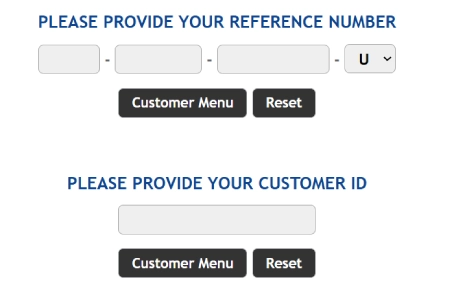
- Enter your reference number or customer ID.
- Click "Check Bill" or "Customer Menu" button.
- View, Download, or Print Your Duplicate Bill
Type your 7-digit Customer ID or your 14-digit reference number in the box above and press Check Bill. Your bill loads in a few seconds. No app download, no account, no CAPTCHA.
What You Need Before You Start
Before you search, have one of these two things ready:
- Your 7-digit Customer ID, printed on any old LESCO bill
- Your 14-digit reference number, also printed on any old LESCO bill
You only need one of them, not both. If you have neither, skip ahead to the section on what to do when you've lost your bill completely.
LESCO Customer ID vs Reference Number — What's the Difference?
Most guides online mix these two up, or they quote different digit counts without checking. Here's what each one actually is, based on LESCO's own website.
What Is a LESCO Customer ID (and How Many Digits Does It Actually Have)?
Your Customer ID is a short number tied to your electricity connection. It stays the same every month, even after your bill amount changes. LESCO's own SMS registration page on lesco.gov.pk states this directly: enter the 7 digits Customer ID from your bill, with no spaces.
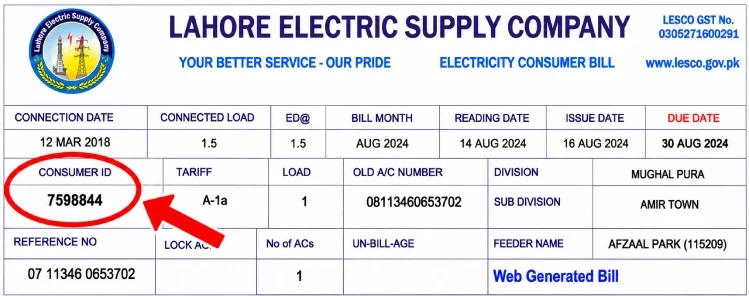
If you've seen other websites claim it's 10 digits, here's the likely reason. A few third-party billing portals use a different, longer account code for their own internal system, and some writers confuse that longer code with the actual LESCO Customer ID. On your paper bill, the field is usually printed just above the reference number and labelled "Customer ID" or "Consumer No." Count the digits on your own bill. If it reads 7 digits, that's your Customer ID. If you see a longer number nearby, that's probably your reference number.
What Is a 14-Digit Reference Number?
The reference number is the longer code on your bill. It has 14 digits, and on newer bills it ends with a single letter — U for urban connections, R for rural ones. This number can change if LESCO updates its billing system, which is why your Customer ID is often the more reliable number to keep saved for the long run.
Comparison Table — What Actually Works for Online Bill Check
| Identifier | Digits | Changes Over Time? | Works for Online Bill Check? |
|---|---|---|---|
| Customer ID | 7 digits | Rarely | Yes |
| Reference Number | 14 digits (+ letter) | Can change after system updates | Yes |
| CNIC Number | 13 digits | Fixed | No |
| Meter/Serial Number | Varies | Changes when meter is replaced | No |
Keep both your Customer ID and reference number saved in your phone. Take a photo of your bill's top-left corner, or add the numbers as a contact in your phone. That way you're never stuck.
How to Check LESCO Bill Online by Customer ID (Detailed Steps)
Step 1 — Locate Your Customer ID on an Old Bill
Pick up any LESCO bill from the last few months. Look at the top-left section, near your name and address. The Customer ID sits just above the reference number, usually seven digits with no letters attached.
Step 2 — Enter It on the Official Portal or This Page
You can check your bill two ways:
- Use the tool at the top of this page
- Go directly to the official LESCO site at www.lesco.gov.pk, open the bill check section, and enter your Customer ID there
Type the number carefully. Don't add spaces or dashes. A single extra space is one of the most common reasons a search fails.
Step 3 — View, Download, or Print Your Duplicate Bill
Once your bill loads, you'll see your name, address, billing month, units used, amount due, and due date. From here, you can:
- Download it as a PDF
- Print it directly
- Take a screenshot for your records
A downloaded LESCO duplicate bill works the same as your paper copy at banks, ATMs, and payment counters.
Don't Have Your Customer ID? Here's What to Do
This is the part most guides skip. If you're searching for online bill check LESCO by customer ID, there's a good chance you're searching precisely because you lost your paper bill and you're hoping there's another way in. Here's the honest answer for each option.
Can You Check LESCO Bill by CNIC Number?
No. LESCO's billing system does not link your CNIC number to your bill lookup. Some websites mention a complaint portal (CCMS) that asks for a CNIC, but that system is built for filing and tracking complaints, not for pulling up your bill. If you type your CNIC into a bill check tool, it will not return your bill.
Can You Check LESCO Bill by Name or Address?
No, not through the standard online bill check tool. LESCO's system is built around your Customer ID and reference number only. If you know your exact address and circle, a LESCO customer service center can look up your account for you in person, but this isn't available as a self-service online option.
Can You Check LESCO Bill by Meter or Serial Number?
No. The meter or serial number is a piece of hardware ID, and it changes whenever your meter is replaced. LESCO's billing database is built around your account, not your equipment, so this number won't pull up your bill.
Lost Your Old Bill Completely — Recovering Your Customer ID
If you don't have a single old bill and don't remember either number, here's what actually works:
- Check your bank or mobile wallet transaction history. If you've paid a LESCO bill through JazzCash, Easypaisa, or your bank app before, the reference number is often saved in that transaction record.
- Visit your nearest LESCO customer service center with your CNIC. Staff can look up your account and give you your Customer ID on the spot.
- Call the LESCO helpline at 118 and ask them to confirm your account details after verifying your identity.
Once you get your Customer ID this way, write it down in two places. A phone note and a physical copy are both worth keeping.
Troubleshooting — Common LESCO Bill Check Errors
"Customer ID Not Recognized"
This usually means one of three things: you typed a digit wrong, you're looking at the reference number instead of the Customer ID, or your account was recently transferred to a new name and the system hasn't updated yet. Double-check the number against your bill first. If it still fails, try the 14-digit reference number instead.
"Bill Not Found" Error
If your Customer ID is correct but no bill shows up, your area's bill may not be uploaded yet for the current month. LESCO uploads bills in batches by circle, not all at once. Wait 24 hours and try again. If you need your bill urgently, the previous month's copy is still valid for reference.
Website Slow or Down Near the Due Date
Traffic on LESCO's billing system spikes hard in the last two or three days before the due date, since thousands of people check and pay at the same time. If the page loads slowly or times out, try again early morning, or use a mobile wallet app like JazzCash or Easypaisa to check your amount instead — they pull the same billing data with less delay.
Customer ID Changed After Name Transfer or New Meter
If you recently transferred the connection into your name, or LESCO replaced your meter, your Customer ID normally stays the same, but your reference number can change. If your old reference number stops working, use your Customer ID as the more stable backup, or contact your local sub-division office to confirm your current numbers.
Is It Safe to Check Your LESCO Bill Online?
What Data This Requires (and What It Doesn't)
Checking your bill online only needs your Customer ID or reference number. Neither one reveals your CNIC, your bank details, or any password. Your bill shows your name, address, and usage history, information that's already printed on your paper bill and visible to anyone who handles it. No login, OTP, or personal verification is needed to view it, which is exactly how the official system is designed to work.
How to Avoid Fake or Unofficial Bill Check Sites
A real bill check tool never asks for your CNIC, your bank card number, or a one-time code sent to your phone. If a site asks for any of that before showing your bill, close the tab. Stick to the official www.lesco.gov.pk site, or a page that pulls data directly from LESCO's own system rather than asking you to log in first.
Understanding Your LESCO Bill — Key Components Explained
Once your bill loads, here's what each section means.
Customer Details Section
Your name, address, connection type, and sanctioned load appear at the top. Check this section first. If your name or address is wrong, report it before you pay, since it can cause problems later with subsidy eligibility or complaint filing.
Units Consumed and Metering Data
This part shows your previous reading, current reading, and total units consumed for the month. Your tariff slab, and therefore your rate per unit, is based on this number.
Taxes and Surcharges
Your bill total isn't just the electricity cost. It also includes:
- Electricity Duty — a fixed government charge, currently around 1.5%
- GST — general sales tax, currently 18%
- FPA (Fuel Price Adjustment) — changes monthly based on fuel costs used to generate power
- FC Surcharge — a fixed cost surcharge added per unit
- QTA (Quarterly Tariff Adjustment) — set by NEPRA every three months
- Income Tax — applies once your bill crosses a certain amount, unless you're a registered tax filer
These are verified by power.gov.pk FAQs section.
12-Month Billing History
Your bill includes a small table showing your last 12 months of usage and payments. This is worth checking once in a while. A sudden jump in units, without a matching jump in your actual electricity use at home, is often the first sign of a meter problem worth reporting.
How to Pay Your LESCO Bill Online After Checking It
JazzCash, Easypaisa, and Mobile Wallets
Open the app, go to bill payment, choose electricity, select LESCO, and enter your reference number. Confirm the amount and pay. This is the fastest option for most people, and payment confirms within seconds.
Bank Apps and Internet Banking
Most major banks, including HBL, UBL, Meezan Bank, and ABL, let you pay utility bills from their mobile app. Look for a "Utility Bills" or "Bill Payment" section, select LESCO, and enter your reference number.
ATM Payment
Insert your card, select bill payment, choose LESCO, and enter your reference number. Confirm the amount shown, enter your PIN, and you'll get a receipt on screen.
QR Code Payment
Newer LESCO bills print a QR code. Open your bank or wallet app, choose QR payment, and scan the code directly from your bill or from the screen after an online bill check. Your bill details load automatically, so there's no manual number entry needed.
Late Payment Surcharge
If you miss the due date, a surcharge applies, usually around 10% of your bill amount. Paying even a day late can trigger this, so it's worth setting a reminder a few days before your due date.
LESCO Tariff and Peak Hours (2026)
Domestic Tariff Slabs
LESCO charges residential customers in three main groups:
- Lifeline consumers — up to 100 units over the last 12 months, charged at the lowest rate
- Protected consumers — up to 200 units over the last six months, charged at a subsidised rate
- Unprotected consumers — above 200 units in a month, charged at the standard rate
The lower your average monthly use, the more likely you are to stay in a cheaper slab.
Peak and Off-Peak Hours
| Season | Peak Hours | Off-Peak Hours |
|---|---|---|
| December – February | 5 PM – 9 PM | Remaining hours |
| March – May | 6 PM – 10 PM | Remaining hours |
| June – August | 7 PM – 11 PM | Remaining hours |
| September – November | 6 PM – 10 PM | Remaining hours |
Tips to Lower Your LESCO Bill
- Switch off lights and fans when you leave a room
- Unplug appliances like TVs and chargers when they're not in use
- Set your AC to 26 degrees instead of a lower setting
- Run heavy appliances like washing machines and irons during off-peak hours
- Replace old bulbs and fans with energy-saving versions
LESCO Complaint and Customer Support
LESCO Helpline Number
Call 118 for general complaints, or 111-000-118 from a landline. This line handles billing questions, power outages, and meter complaints.
How to Register a Complaint Online (CCMS)
Visit the CCMS portal, select your complaint type, enter your Customer ID or reference number, and describe the issue. You can attach a photo of your meter or bill if needed. Keep your complaint number once it's submitted. It's your proof that you reported the issue, and you'll need it if you have to follow up.
SMS Bill Alerts
Register for free SMS alerts by submitting your Customer ID and mobile number on the LESCO site. Once registered, you'll get a text the moment your meter is read, and another when your bill is ready, with the amount and due date included.
How to Apply for a New LESCO Connection
Need power for a new home, shop, or office? You can apply for a new Lahore Electric Supply Company connection online, before visiting any office.
Steps to apply:
- Visit the official ENC portal on enc.com.pk. The government's gateway for all electricity providers.
- Choose LESCO as your distribution company. Select the type of connection: domestic, commercial or industrial.
- Type in the 14-digit reference number for your neighbour. LESCO uses this to determine your area.
- Fill in your details: name, father's name, CNIC, mobile number, and address.
- Upload your documents: CNIC copy, Proof of property ownership, Witness's CNIC copy, Neighbor's bill copy and Wiring test report from a licensed electrician
- Submit the form. Save your tracking ID.
- Print the application. Take it, with your documents, to your nearest LESCO office.
LESCO then checks your documents and visits the site. After that, they issue a demand notice. This notice lists your meter cost, security deposit, and service charges. Once you pay this at a bank, LESCO installs your meter.
You can track your application anytime. Use your tracking ID on the ENC portal, or call the LESCO helpline at 111-000-118.
Why Checking Your Bill Online Helps You
Checking your LESCO Lahore bill online saves you time. Here is what you gain:
- You see your bill amount before the paper copy reaches home.
- You pay on time and avoid late payment charges.
- You get a free duplicate copy if you lose your paper bill.
- You can check past bills to track your usage.
- You spot billing changes early, like a fuel charge adjustment, instead of being surprised later.
- You get a copy ready for bank payment or your records, in seconds.
About This Guide
Who Verified This Information
Author Shoaib Nasir verified this Information against a live LESCO bill and against LESCO's Official website, lesco.gov.pk, before publishing. Where third-party sources disagreed with each other, such as the Customer ID digit count, we went with what LESCO's own site states directly, and we've explained the source of the confusion above instead of just picking a number.
Last Updated
This guide was last checked and updated in 30 October 2026. We review it again whenever LESCO changes its billing portal, tariff rates, or peak hour schedule.
Disclaimer
This page is an independent guide and is not affiliated with, endorsed by, or connected to LESCO, PITC, or WAPDA. For official bill records, complaints, or account changes, use the official LESCO website at www.lesco.gov.pk or visit your nearest LESCO office.
Frequently Asked Questions
Is the LESCO Customer ID the same as the Reference Number?
Both numbers are printed on your bill, near the top. The reference number has 14 digits. On newer bills, it ends with a letter: U for urban areas, R for rural areas. The Customer ID is shorter, with 7 digits. You only need one number to check your bill. Many people save the Customer ID, since it does not change.
How can I report a power outage?
Call 118 from any phone to report a power outage or billing complaint. If 118 does not work on your network, call the toll-free number 0800-00118 instead. You can also report it through the LESCO Light mobile app, or visit your nearest LESCO customer service center.
Is it safe to pay the bill online?
Yes, making online payments to LESCO is safe, if the official channels are used. Make the payment via Easypaisa, JazzCash or your Bank’s Application. These use a One-Time Password (OTP) to verify each and every payment. Prior to paying, ensure that the biller name is written as “LESCO” and the amount is correct for your bill. Do not give out your PIN or OTP to any one, not even to those who say they are from LESCO.
Can I check my LESCO bill from my mobile phone?
Yes. You can check your LESCO Lahore bill online on Pakbiz, through a smartphone browser. Enter your 7 customer ID on the bill checker above to view and download your bill.
Is my LESCO online bill the same as the paper bill?
The online version is intended to provide the relevant billing information electronically. The exact format and available details can vary depending on the service used to retrieve the bill.
What is the full form of LESCO?
LESCO stands for Lahore Electric Supply Company. It is responsible for the distribution and supply of electricity to Lahore and surrounding areas in Punjab, Pakistan
Sources:



online bill checking sy physically ja kr khuwar hony sy bach jata h banda
M reference number or customer ID m confuse tha lkn ab clear hogya