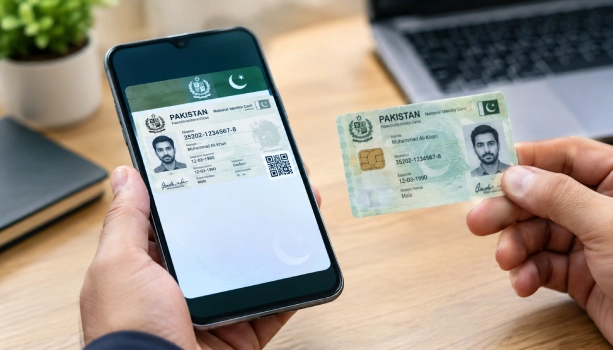
NADRA has told every government office and private company in Pakistan to accept the Digital ID. This new rule ends the old habit of asking citizens for a physical CNIC or a photocopy of one. The Digital ID, stored on the PakID app, now carries the same legal weight as your plastic card.
Why NADRA Issued This Notice
NADRA said it had noticed offices still demanding a physical CNIC or its photocopy. Many of these offices were refusing the Digital ID, the dematerialized CNIC, the NICOP, and the POC. All four are available through NADRA's own app, PakID. NADRA called this refusal a breach of the law and told offices to stop right away.
The Law Behind the Mandate
The Digital ID has two rules that provide the legal power. The first is the NADRA Ordinance 2000 which tasked NADRA to operate the National ID database and to provide ID documents. The second is the NADRA Digital Identity Regulations 2025, which for the first time provided legal status to the Digital ID.
Regulation 9 – Legal Recognition: Digital identity credential from NADRA has the same legal status as a physical one. It also concurrently attains the same evidentiary effect in any dispute or check.
Regulation 10 – Mandatory Acceptance: Any public authority or organization that needs proof of identity must accept your digital credential. This holds true at a bank counter, a government desk, or a private office.
Which Documents Are Covered
The mandate covers four digital documents: the Digital ID, the dematerialized CNIC, the digital NICOP, and the digital POC. You carry all four inside the PakID app on your phone, so there's nothing extra to download or print.
Who Must Accept Your Digital ID
NADRA named several groups that now have to follow this rule, and it has asked them to pass the instruction down to their own staff.
- Government departments and public authorities
- Banks and other financial institutions
- Telecom operators
- Any other service provider that asks for identity proof
Why NADRA Wants More People Using It
Digital ID cuts down on photocopies of your CNIC floating around. Fewer photocopies mean less risk that your personal data ends up in the wrong hands. NADRA says this step is meant to protect citizens from identity misuse.
What To Do If Your Digital ID Gets Refused
You don't have to hand over a physical CNIC just because an office asks for one. NADRA wants you to file a complaint instead of arguing at the counter.
- Open the PakID app and show your Digital ID again, in case it was a simple mix-up.
- Note down the name of the office or company that refused it.
- File a complaint through NADRA's Complaint Management System at nadra.gov.pk/complaint.
- Or call the NADRA helpline. Dial 1777 from a Mobilink, Ufone, Telenor, or Zong number, or +92-51-111-786-100 from a landline or from abroad.
- Save your complaint ID so you can track the reply. NADRA's system usually responds within 48 hours.
Also check this guide about how to check NADRA Voter List Online in easy steps.



