
Click the button below to check your LESCO duplicate bill. Enter your 14-digit reference number or 7-digit Lesco Customer ID and press “Check Bill.” Your bill will load within a few seconds, showing the amount, due date, units consumed, and meter reading. You can then view, print, or save it as a PDF.
LESCO Duplicate Bill Checker November 2026
If you don't have either number handy, keep reading. The sections below explain where both numbers sit on an old bill, how to look them up on LESCO's own government website if you've lost both, and what to do when something doesn't match.
Why You Might Need A Duplicate Bill
A duplicate bill is a fresh copy of your Lahore Electric Supply Company bill, pulled straight from the same billing system LESCO itself uses. People usually need one when the original goes missing, arrives late, or gets thrown out with old mail. A duplicate copy also comes in handy for a bank loan application, a NADRA address check, tax filing, or simply keeping a record of what got paid and when.
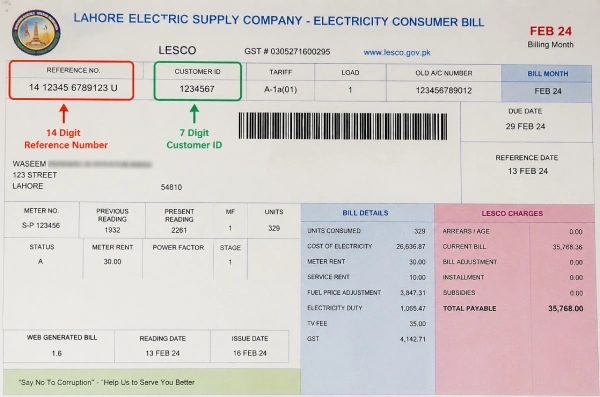
Find Your Reference Number And Customer ID
Every LESCO bill carries two numbers, and either one is enough to check a duplicate copy.
The reference number runs 14 digits long, sometimes followed by the letter U for urban connections or R for rural ones. It sits near the barcode, usually along the top of the bill.
The Customer ID is shorter, 7 digits on most bills, printed closer to your name and address. It stays the same every month, unlike the reference number, so writing it down once saves a search later.
Check Your Bill on the Official LESCO Website
The tool above pulls from the same system as LESCO's own government site, so this is mainly a backup for when you want a second look or the number above isn't cooperating.
- Open https://bill.pitc.com.pk on a phone or computer.
- Find the Bill Information or Duplicate Bill section on the homepage.
- Enter your 14-digit reference number, or your Customer ID if that's what you have on hand.
- Press the button to view your bill.
- The bill opens on screen with the amount, due date, units consumed, and meter reading.
- Press Ctrl and P together, pick Save as PDF from the printer list, and save the file. That saved copy is your duplicate bill, ready for payment or record keeping.
Can I check my LESCO bill using CNIC?
No. CNIC is not used as the bill number when checking the bill. If you have lost your reference number and Customer ID, CNIC may be useful for recovering your billing information through an official LESCO service, where available.
Lost Your Reference Number Too
Go to www.lesco.gov.pk and open the CNIC registration option from the menu. Choose Search by CNIC, enter your CNIC number, and the site returns your reference number and Customer ID together. Write both down somewhere safe once you have them, since bills tend to go missing at the worst possible time.
Other Ways To Get Your LESCO Bill
LESCO also runs a free SMS, WhatsApp, and email billing service. Registration happens on the official website, under the SMS and Email service section. Once it's set up, the bill lands in your inbox or phone automatically every month, no reference number hunting required.
Some people search this as lesco bill check karne ka tarika, and the steps stay the same no matter how the question gets phrased. Reference number or Customer ID, official site or a trusted tool, that's the whole process.
A Quick Safety Note
Stick to your reference number or Customer ID when checking a bill online. Never type your CNIC, bank account, or card number into a bill checking page unless it's the official LESCO government site itself. A duplicate bill check needs nothing more than that one number, and any page asking for more deserves a second look.
Need Help Beyond A Duplicate Bill
For anything past a duplicate bill, a power outage, a meter fault, or a wrong reading, LESCO runs a helpline around the clock. Call 118 or the toll free 0800-00118 line, or send a complaint by SMS to 8118. The central complaint and monitoring cell also takes calls at 111-000-118 for urgent supply issues.
Frequently Asked Questions
What is a LESCO duplicate bill?
A fresh copy of your original electricity bill, generated from LESCO’s system using your reference number or Customer ID. It shows the same amount, due date, and consumption details as the original.
What’s the difference between the reference number and Customer ID?
The reference number runs 14 digits and shifts slightly with each billing cycle. The Customer ID is 7 digits and stays fixed every month, which makes it a solid backup once it’s written down.
I lost my old bill and don’t know either number. What now?
Visit www.lesco.gov.pk, open the CNIC registration section, and search using your CNIC. The site returns your reference number and Customer ID right away.



