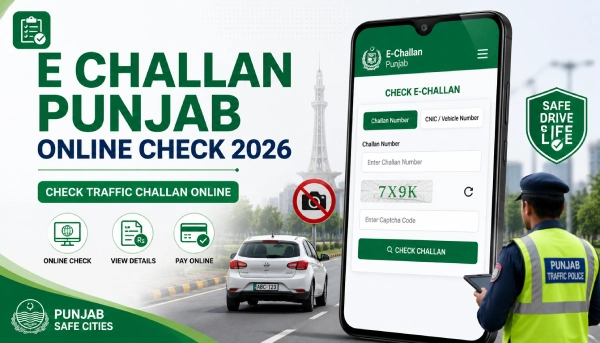
If you want to check your Punjab e-challan online, you can do it through the official PSCA e-challan portal at echallan.psca.gop.pk. This is the system Punjab Safe Cities Authority uses to record traffic violations picked up by safe city cameras across the province. To check your challan, you’ll usually need your vehicle registration number along with your CNIC or chassis number, since the portal asks for these together rather than either one on its own.
Quick E Challan Punjab Online Check
Here’s the short version if you just want to check right now:
- Open the official PSCA e-challan portal.
- Go to the challan-check section on the site.
- Enter your vehicle registration number and CNIC (or chassis number) as asked.
- Complete the captcha if one appears.
- Submit the form and review your e challan details, including amount and status.
- If a payment option is shown, follow the instructions on the portal to pay.

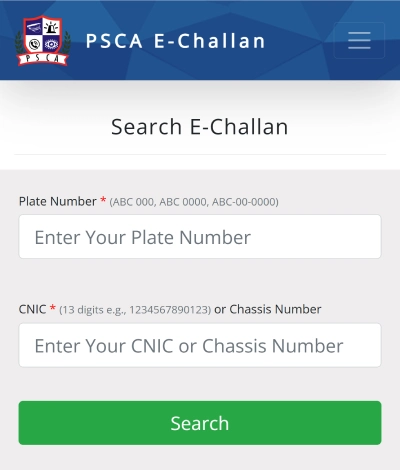
That’s the whole process. The rest of this guide covers each step in more detail, plus what to do if something doesn’t work.
What Is Punjab E Challan?
An e-challan is a digital traffic ticket. Instead of a traffic warden writing you a paper slip, a safe city camera records the violation and the system generates the challan automatically, then links it to your vehicle record.
A typical Punjab e-challan includes:
- Vehicle details
- Violation type
- Challan amount
- Date and time
- Location
- Challan status (paid or unpaid)
- Payment information
You can view all of this once you check your challan on the official portal.
How to Check E Challan Punjab Online: Step-by-Step
Here’s the process in more detail:
- Visit the official PSCA e-challan website.
- Look for the section meant for checking challans.
- Enter the details the form asks for, usually your vehicle number and CNIC or chassis number.
- Complete any captcha or verification step shown on screen.
- Submit the form.
- Review the challan record that appears, including violation type, amount, and status.
- Save or download the details if the site gives you that option.
Keep in mind the exact layout of the portal can change whenever PSCA updates it, so a field or button you see today might look slightly different next month. The steps above cover the general process either way.
E Challan Punjab Online Check by Vehicle Number
You can check your challan using your vehicle registration number, but the official portal asks for it alongside your CNIC or chassis number rather than as a standalone search field. Enter your registration number exactly as it appears on your vehicle documents, without extra spaces or symbols.
Once submitted, the system shows any challans linked to that vehicle, along with the violation details and payment status. If nothing shows up, double check the number you entered before assuming there’s no challan against your vehicle.
Check E Challan Punjab Online by CNIC
CNIC checking works the same way, as part of the same form rather than a separate CNIC-only search. Enter your 13-digit CNIC exactly as printed on your card.
Be careful with third-party sites that claim to pull up your full challan history from just a CNIC, no other details needed. Stick to the official PSCA portal for anything involving your CNIC or vehicle information, since that’s the source your challan record actually comes from.
How to Check Punjab Traffic Challan Status
Once your details go through, the portal shows a record with:
- Challan number
- Vehicle information
- Violation details
- Challan date
- Challan amount
- Payment status
- Due date, if shown
An unpaid challan means the fine hasn’t been cleared yet and usually still shows an amount owed. A paid challan should show a cleared or settled status, along with the date it was paid. If your challan looks unpaid despite you having paid recently, give it a little time. Payment status doesn’t always update the instant you pay.
How to Pay Punjab E Challan Online
Once you’ve confirmed the challan details are correct, follow the official payment option shown on the portal itself rather than a link from somewhere else. The general process looks like this:
- Check the challan details carefully.
- Confirm the violation and amount match what you expect.
- Select the payment option the official portal provides.
- Complete the payment through that channel.
- Keep your receipt or transaction confirmation for your records.
Some challans generate a payment reference number as part of this process, which you may need to complete the transaction. Always confirm the exact payment method through the official portal, since these details can change.
What Information Is Needed to Check an E Challan?
| Information | Why It May Be Needed |
|---|---|
| Vehicle registration number | To identify the vehicle |
| CNIC | Required alongside the vehicle number on the official portal |
| Chassis number | Accepted as an alternative to CNIC on some checks |
| Challan number | To locate a specific challan, if you already have one |
The exact fields required can shift a bit depending on how the portal is set up at the time you check, so treat this as a general guide rather than a fixed list.
What If No E Challan Record Appears?
A few things can cause this:
No challan has actually been issued against your vehicle.
One of the details you entered doesn’t match your records exactly.
The violation hasn’t been processed into the system yet.
The portal is temporarily down or slow.
You checked through a method the official system doesn’t support.
Double-check your entries and try again through the official portal before assuming your record is clean. No result showing up isn’t the same as confirmation that you have no violations, especially if the camera capture is still being processed.
How to Avoid Fake E Challan Websites
A lot of unofficial sites copy the look of the real PSCA portal, so it’s worth being careful:
Use the official Punjab government or PSCA website for checking and paying challans.
Check the website domain before entering your CNIC or vehicle details.
Avoid links sent through SMS or WhatsApp claiming to show your challan.
Never share OTPs, passwords, or banking details with anyone contacting you about a challan.
Don’t pay a challan through a site just because it shows up near the top of a Google search.
If a site isn’t the official PSCA portal, treat any challan details or payment request from it with caution.
Punjab E Challan vs Traditional Traffic Challan
A traditional challan is issued by hand, usually by a traffic warden on the spot. An e-challan is generated automatically by safe city cameras and recorded digitally, without a warden needing to stop your vehicle. Both are legally valid, but an e-challan reaches you through SMS or the online portal instead of a paper slip.
Common Punjab E Challan Issues
Incorrect Vehicle Number
If your challan search comes back empty, check that you entered your registration number exactly as it appears on your documents. Even a small typo can mean no match.
Challan Not Showing
Sometimes a recent violation just hasn’t made it into the system yet. Wait a bit and check again later through the official portal.
Website or Payment Not Updated
If the portal is slow or down, try again after some time. If you’ve already paid but the status still shows unpaid, keep your receipt. Payment status can take a while to reflect on the portal.
How can I check my Punjab e-challan online?
Visit the official PSCA e-challan portal, enter your vehicle registration number along with your CNIC or chassis number, and submit the form to view your challan status.
What should I do if my e-challan details are incorrect?
Don’t pay a challan you believe is wrong. Contact the relevant traffic authority to raise the issue instead.
How do I know if my challan has been paid?
The challan record on the official portal shows a payment status field, marked as paid or unpaid, once you check.
Before making any payment, always confirm your challan details through the official Punjab e-challan portal. That’s the one place your record is guaranteed to be accurate.



