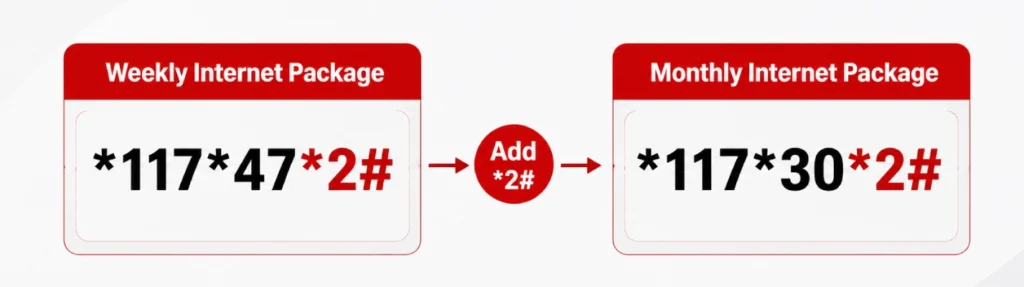
There’s no single code that works for every Jazz package in 2026. The real rule is simple, take your package’s own subscription code and add *2# at the end. So if you’re on the weekly internet package, you’d dial *117*47*2#. If you’re on the monthly package, it’s *117*30*2#. Below is the full guide, with a few extra steps that make this very easier.
Why There’s No One “Universal” Code
Jazz runs dozens of different internet packages, daily, weekly, monthly, and each one has its own subscription code. Because of that, the MB check code changes depending on what you’re subscribed to. Once you know this one rule, you can check any package, not just the two examples below.
The *2# Rule: How It Actually Works
Find out the subscription code of your current package. If you don’t remember it, see the step below.
- Add *2# to the end of that code.
- Dial it like a normal USSD code.
- You’ll get an instant reply showing your remaining MBs
Here are two common examples:
Weekly Internet Package: Subscription code *117*47#, so the check code is *117*47*2#
Monthly Package: Subscription code *117*30#, so the check code is *117*30*2#
Don’t Know Your Active Package? Check This First
This step gets skipped everywhere else, but it matters. If you’re not sure which package you’re even on, dial *443# on your Jazz SIM. You’ll get an SMS listing your active packages by name. Once you have the name, you can look up its subscription code and apply the *2# rule above.
Check Your MBs Without Remembering Any Code
If codes aren’t your thing, these work just as well.
Jazz World (SIMOSA) App

Download the Jazz World app, now also known as SIMOSA, from the Play Store or App Store.
Log in with your Jazz number.
Open the “My Account” or MB usage section to see your remaining data straight away.
Jazz Website
Visit Jazz’s official website on your phone or computer.
Log in with your Jazz number.
Check your data balance under “My Account.”

A Few Basic Tips That Genuinely Help
- Save the *443# code somewhere on your phone. It solves the “which package am I even on” problem before you try anything else.
- USSD codes on Jazz can sometimes carry a very small tax charge, so don’t be surprised by a tiny deduction after dialing.
- If you use the app once, log in and leave yourself signed in. It’s faster than dialing a code every time after that.
- Keep the Jazz helpline number saved. It’s the easiest backup when nothing else works.
Still Stuck? Call Jazz Support
If none of the above works, dial 111 from your Jazz SIM. A representative can check your remaining MBs and package details directly on their end.



