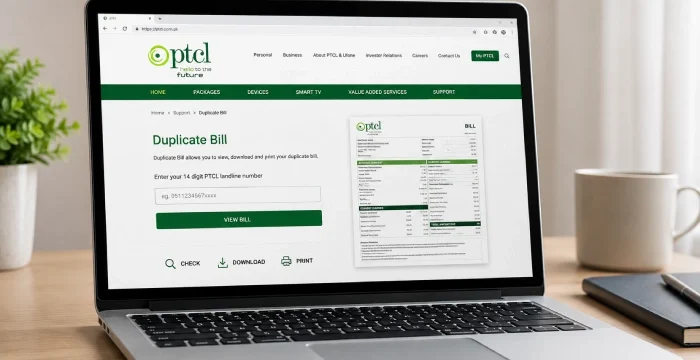
Missing your PTCL bill? Check, view, and download your duplicate PTCL bill online in minutes with just your phone number and Account ID.
Check PTCL Duplicate Bill Online September 2026
Click the button below, enter the required subscriber details, and download or print your duplicate bill online.
PTCL runs a free duplicate bill service called DBill at dbill.ptcl.net.pk. It works for landline, broadband, GPON, EVO, and CharJi customers, and you don’t need to log in or create an account. All you need is your phone number and Account ID, and your bill loads on screen in seconds. This guide walks you through the exact steps, what to do if you don’t have your Account ID, and how to fix the common problems people run into.
How to Check PTCL Duplicate Bill Online – Step by Step
PTCL runs its own bill-checking portal, and this is the most direct and safest route to use.
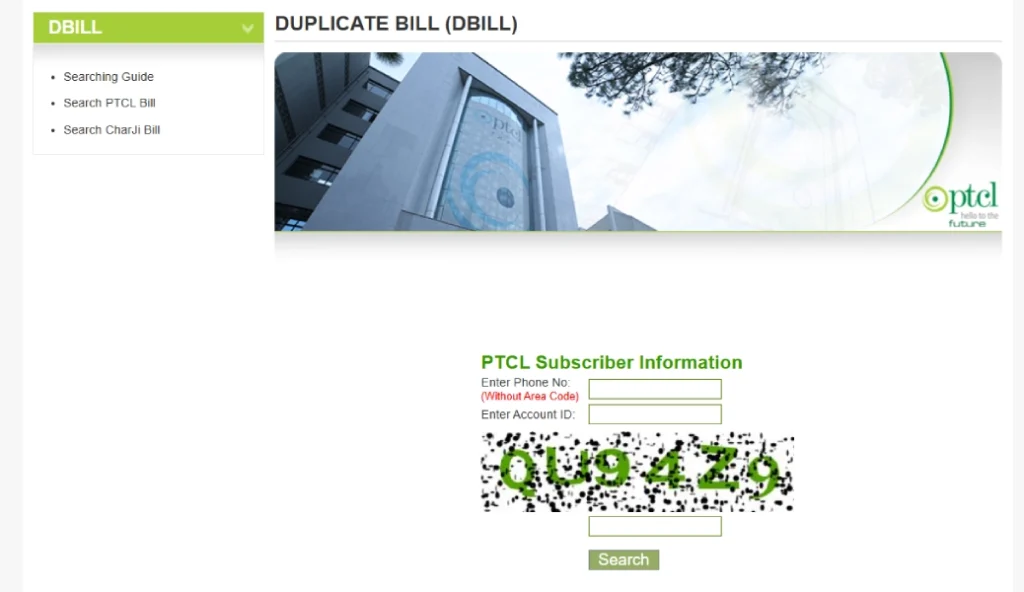
- Go to dbill.ptcl.net.pk in your browser.
- Choose “PTCL Landline” for a phone or broadband bill, or “PTCL CharJi/EVO” for a wireless internet device.
- Type in your phone number (no area code) and your account ID.
- Click the search button.
- Your bill loads on screen with the full breakdown.
Give the page a few seconds after you hit search. PTCL’s server can slow down at peak hours, especially near the end of the month, when a lot of people are checking their bill at the same time.
What Is a PTCL Duplicate Bill?
A PTCL duplicate bill, sometimes called a “dbill” or “e-bill,” is a copy of your original PTCL bill. It shows the same billing month, charges, and due date as the paper bill PTCL normally delivers to your home or office.
What You Need to Check Your PTCL Bill
Checking your PTCL bill online takes two pieces of information.
Phone number – your PTCL landline or broadband number, entered without the area code. For example, type 1234567, not 021-1234567.
Account ID – a 10-digit number printed on every PTCL bill, usually in the top right corner. It stays the same every month, so once you have it, save it somewhere you won’t lose it. If you’ve signed up for PTCL e-bill, this number also appears in the billing email PTCL sends you.
If you don’t have an old bill nearby and can’t find your account ID, skip to the “without account ID” section below.
How to Download or Print Your PTCL Duplicate Bill
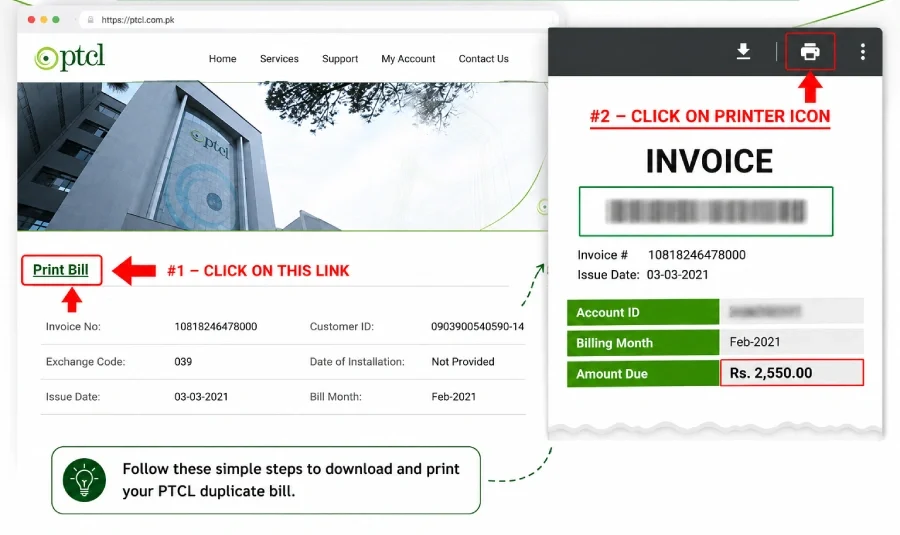
After your bill loads, look for the download icon on the bill view page. Click it to save your bill as a PDF. If you don’t see a direct download button, right-click the bill and choose “Save As” instead. You’ll need a PDF reader like Adobe Acrobat Reader to open the file.
How to Print Your PTCL Duplicate Bill
To print your bill, click the print icon on the bill page and make sure a printer is connected to your device. The printed copy carries the same amount and due date as the original, so banks and payment counters accept it the same way.
Is a PTCL Duplicate Bill Valid for Payment?
Yes. A duplicate bill pulled from dbill.ptcl.net.pk is an exact copy of your original bill. It carries the same account details, amount due, and due date, so you can pay it at any bank branch, mobile wallet, or the PTCL Touch app, just like the paper copy.
How to Get a PTCL Duplicate Bill Without an Account ID
Where to Find Your PTCL Account ID
Your Account ID is a 10-digit number printed in the top-right section of any earlier PTCL bill, right next to your phone number. If you switched to e-billing, check the PDF copy PTCL emailed you. On very old bills, this number may be labeled “Customer ID” instead.
How to Check Your PTCL Bill Without an Account ID
If you can’t find your Account ID anywhere, call the PTCL helpline at 1218 (open 24/7) or dial the UAN 111-20-20-20. Give the agent your registered phone number and CNIC, and they’ll confirm your Account ID over the call. Once you have it, go back to dbill.ptcl.net.pk and check your bill the normal way.
Reading Your PTCL Bill: What Each Line Means
Once your bill loads, here’s what you’re looking at:
- Billing month – the period the charges cover.
- Line rent – the fixed monthly charge for your connection or package.
- Call charges – any billed calls outside your package, if you have them.
- Internet/broadband charges – your monthly internet package cost.
- Other services – add-ons like Smart TV, if you’ve subscribed to one.
- Previous balance – any unpaid amount carried over from last month.
- Taxes and surcharges – government taxes applied to your bill.
- Total payable amount – what you actually owe, with the due date next to it.
Give this a quick look every month. It takes a minute, and it’s the easiest way to catch a billing mistake before you pay it.
PTCL Landline, Broadband, GPON, EVO & CharJi Bill
Landline and DSL broadband bills use the same process. Select “PTCL Landline Bill” on the portal, enter your phone number without the area code and your Account ID, then click Search. If you have a bundled connection, your bill shows both landline rental and broadband charges together.
PTCL GPON Duplicate Bill
GPON is PTCL’s fiber internet service, and its duplicate bill works exactly like a landline bill. Select the landline option, enter your phone number and Account ID, and your GPON bill loads with the same detail as any other PTCL bill.
PTCL EVO and CharJi Duplicate Bill
EVO and CharJi are PTCL’s wireless broadband devices, so they use different login details. Select “PTCL CharJi/EVO Bill” on the portal, then enter your MDN (your mobile number with area code, for example 21 3xxxxxxxx for Karachi) and your device’s ESN instead of an Account ID. You’ll find the ESN printed on the device box or in your original CharJi welcome SMS.
How to Check PTCL Bill Status and Payment Details
To see if your last bill has been paid, pull up your current bill at dbill.ptcl.net.pk. If your previous balance shows as zero, your last payment has already been recorded. You can also call 1218 and ask an agent to confirm your payment status directly.
PTCL Bill Due Date and Outstanding Amount
Every PTCL bill lists two figures clearly: the amount due and the due date, usually printed around the 20th of the month. If you miss this date, the bill also shows a slightly higher “amount after due date,” which covers a late payment surcharge. Paying on or before the due date keeps this extra charge off your account.
How to Pay Your PTCL Duplicate Bill
Once you’ve downloaded your bill, here are the ways to pay it:
- JazzCash or Easypaisa app – log in, select bill payment, choose PTCL, and enter your account ID.
- PTCL Touch app – the official app lets you view and pay your bill with a card or wallet.
- ptcl.com.pk – pay directly by card (Visa, MasterCard, or UnionPay) under Bill Payment.
- Bank branch or ATM – take a printed copy to any partner bank, or pay through HBL ATMs.
- *786# USSD code – dial this on a Jazz number if you don’t have internet access, and follow the on-screen steps.
TCS Courier center – pay in person with your printed landline bill.
Common Problems When Checking Your Bill Online (and How to Fix Them)
- “No record found” or a blank result – double-check you’ve removed the area code from your phone number, and that your account ID is exactly 10 digits with no spaces.
- The page won’t load or times out – this usually happens when PTCL’s server is under heavy traffic close to the due date. Wait a few minutes and try again, or try later at night.
- Bill amount looks higher than expected – check the previous balance line first. Most surprise charges come from an unpaid amount carried forward, not a mistake in that month’s usage.
- New connection, and the bill isn’t showing yet – your first bill can take a full billing cycle to appear online. Call the helpline if it’s been more than a month since installation.
- Bill hasn’t updated after payment – give it one to two working days. If it still shows unpaid after that, call 1218 with your payment receipt on hand.
Due Dates and Late Payment
Your due date is printed clearly on every PTCL bill, right next to the total amount. Pay by that date to avoid a late payment surcharge on your next bill. If you know you’ll miss it, checking your duplicate bill early still helps. At least you’ll know the exact amount owed and can plan a payment method that clears in time.
Keep Your Account Details Safe
A few basic habits go a long way here. Only enter your phone number and account ID on PTCL’s official pages, dbill.ptcl.net.pk or ptcl.com.pk. Never share your CNIC, OTP, ATM PIN, or online banking password with anyone who claims to help you check a bill, whether by phone or through a website. PTCL never needs your banking password to show you a bill
Frequently Asked Questions
Is checking a PTCL duplicate bill free?
Yes. PTCL doesn’t charge anything to view, download, or print a duplicate bill.
How many months back can I check my PTCL bill?
The online portal usually shows your current and most recent bill. For older bills, contact the helpline or visit a service center.
Is a duplicate bill valid for payment?
Yes. Banks, wallets, and PTCL’s own payment channels treat a duplicate bill the same as the original paper copy.



