HAZECO Bill Checker September 2026
Enter 14 digit reference number after clicking the button below to view and download your HAZECO duplicate bill online. No login required
Hazara Electric Supply Company, known as HAZECO, bills electricity for Abbottabad, Haripur, Mansehra, Battagram, Torghar, and the Kohistan districts of Khyber Pakhtunkhwa. This guide covers the 2026 HAZECO billing cycle and works the same way for older bills too. Here’s how to run a HAZECO online bill check with your 14-digit reference number, read what’s on the bill, and pay or dispute it, using facts from HAZECO’s own site and the PITC system it bills through.
How to Check Your HAZECO Bill Online
- Get your reference number. Pick it up from your last paper bill, an SMS from HAZECO, or a past payment receipt.
- Enter it in the checker. Type only the digits, no dashes or spaces, into the reference number field on this page.
- Open your bill. The result shows your units, amount due, and due date, pulled from HAZECO’s PITC record. Download it as a PDF if you need a copy for the bank.
Where to Find Your HAZECO 14-Digit Reference Number
- Look at the top of your bill, in the box marked “Reference No.” or “Ref No.“
- It’s usually 14 digits, though a few older bills list it with fewer digits.
- The number belongs to your meter, not to one billing month, so it stays the same on every bill from that connection.
- If your bill still shows a PESCO reference number from before the split, try it first — it runs through the same PITC system. If it doesn’t return a result, use the number printed on your most recent HAZECO bill instead.
- CNIC doesn’t work as a lookup. The PITC system only accepts the reference number.
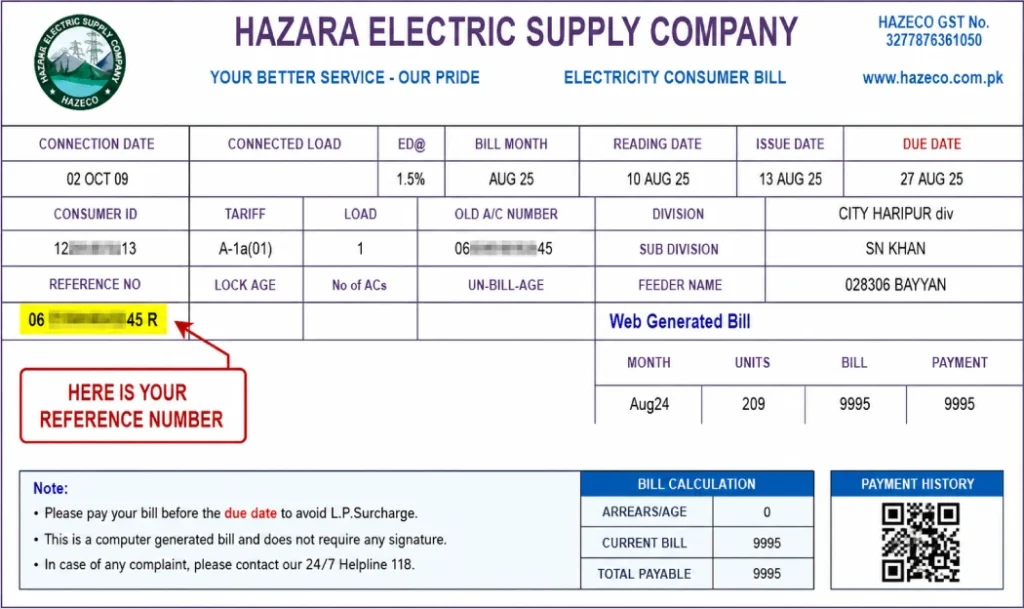
See the HAZECO bill image to find your 14 digits reference number.
What Your HAZECO Duplicate Bill Shows
- Billing month and issue date
- Units consumed for the month
- Amount payable, shown for before and after the due date
- Due date for payment
- Current and previous meter reading
- Consumer name and connection address
The duplicate HAZECO bill carries the same figures as your printed bill because both come from the same PITC record. Banks, ATMs, and mobile wallets accept it for payment.
Areas HAZECO Covers
HAZECO is headquartered in Abbottabad and serves eight districts of the Hazara region:
- Abbottabad
- Haripur
- Mansehra
- Battagram
- Torghar
- Upper Kohistan
- Lower Kohistan
- Kolai Palas
Understanding the Charges on Your Bill
- Energy charge — your units multiplied by the slab rate for your consumer category.
- Fuel Price Adjustment (FPA) — a per-unit charge set by NEPRA that moves with fuel costs, so it can change from month to month.
- GST and TV fee — government tax and licence fee added on top of the energy charge.
- Meter rent — a fixed monthly charge for a rented meter, where it applies.
- Late payment surcharge — added if you pay after the due date, under NEPRA rules, and carried onto the next bill along with any arrears.
For exact slab rates, use HAZECO’s own Tariff Guide.
How to Pay Your HAZECO Bill
- Bank branch or ATM
- JazzCash or Easypaisa
- National Bank of Pakistan or HBL Konnect — both set up with HAZECO for digital bill payment
Post office, where available
Pay before the due date printed on the bill to avoid the late surcharge.
Raising a Complaint or Reporting a Fault
- Call 118, the contact centre number shared by HAZECO and other government-run DISCOs.
Send an SMS to 8118 with your complaint. - File online at ccms.pitc.com.pk, the same “Register Complaint” link on HAZECO’s own site.
- Your complaint gets an automatic acknowledgment within 24 hours, and PITC works to resolve it within 14 days.
- If you’re not satisfied with the outcome, you can write to the Head of Quality & Assurance at [email protected].
Applying for a New HAZECO Connection
New domestic, commercial, or industrial connections go through the Electronic New Connection system at enc.com.pk, the link HAZECO’s own site sends applicants to.
About Hazara Electric Supply Company (HAZECO)
HAZECO was set up on 6 January 2023, when the government split PESCO into two companies to give the Hazara region its own distribution company. It began running independent operations, separate from PESCO, on 1 July 2025. HAZECO is regulated by NEPRA and led by CEO Qazi Muhammad Tahir. Bills are generated and read through PITC, the same billing system used by other government-run DISCOs such as PESCO, LESCO, and MEPCO.
FAQ’s
Is HAZECO the same company as PESCO?
No. HAZECO split off from PESCO on 6 January 2023 to run billing and operations for the Hazara region on its own, and it started independent operations on 1 July 2025.
Where do I find my HAZECO reference number?
It’s printed at the top of your bill, labelled “Reference No.” or “Ref No.” It’s usually 14 digits and stays the same every month.
Can I check my HAZECO bill with my CNIC?
No. The PITC system that HAZECO bills run on only accepts the reference number as a lookup.
Is the online duplicate bill the same as my printed bill?
Yes. Both are read from the same PITC record, so the units, amount, and due date match.
What happens if I pay my HAZECO bill late?
A late payment surcharge is added under NEPRA rules, and it shows on your next bill along with any arrears.
Which districts does HAZECO serve?
Abbottabad, Haripur, Mansehra, Battagram, Torghar, Upper Kohistan, Lower Kohistan, and Kolai Palas.
How do I complain about a wrong bill or report an outage?
Call 118, send an SMS to 8118, or register online at ccms.pitc.com.pk. You’ll get an automatic acknowledgment within 24 hours.



